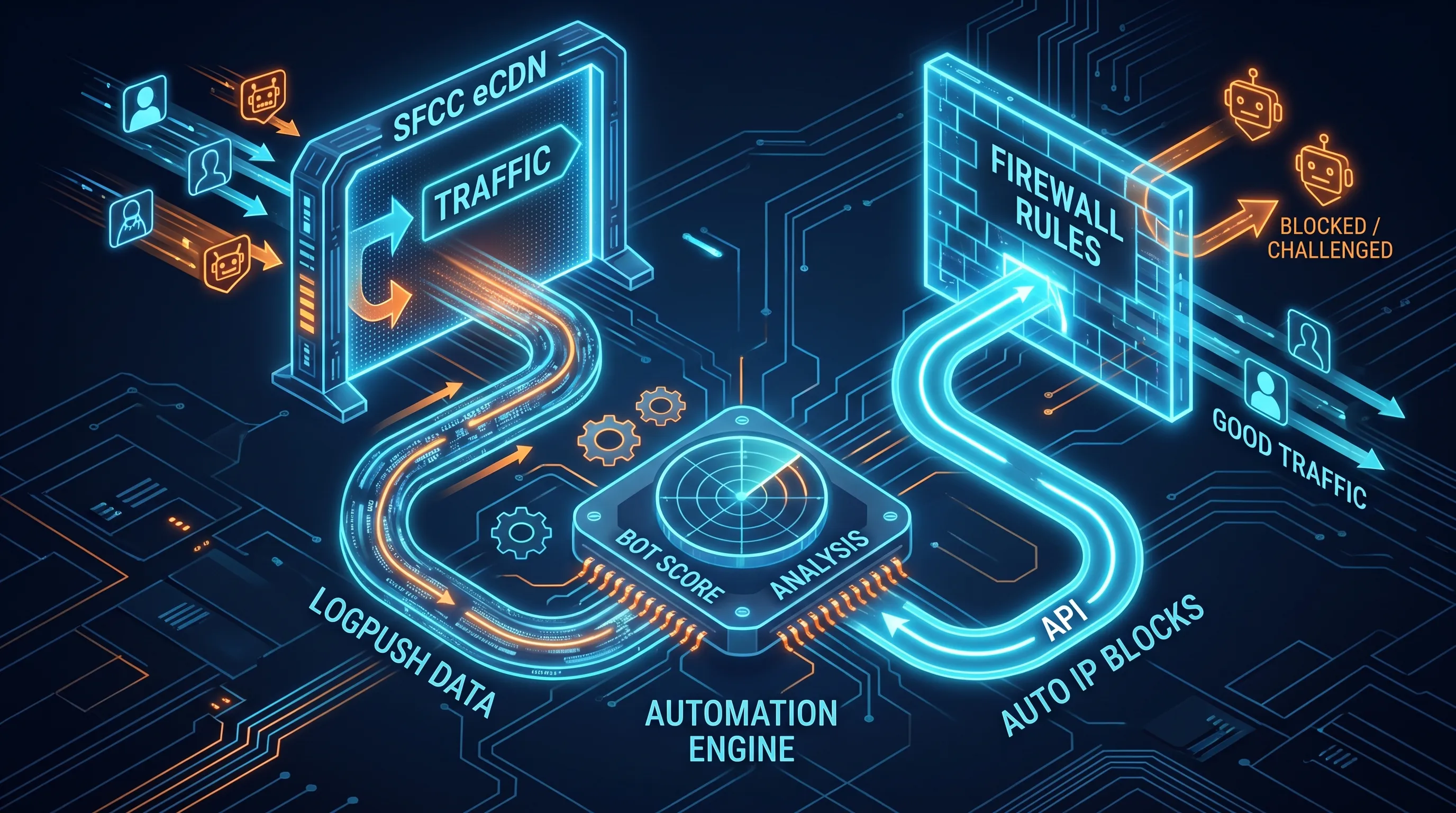
In the Logpush article I said you can act on your eCDN logs, not just store them. Acting can mean a lot of things: a dashboard that shows who your traffic really is, a look back at what happened during last month's sale, or a firewall rule. This article is about that last one, and about automating it.
The short version: Cloudflare already gives every request a bot score, and Logpush ships that score to your bucket. You just can't use it in a firewall rule. So I built a small proof of concept that reads the score from the logs, finds the IPs that keep scoring like bots, and writes eCDN firewall rules for them. A second loop removes those rules once they stop matching.
Here is the demo:
The score is in the logs, not in the rules
Every HTTP request record in Logpush carries a BotScore from 1 to 99. Close to 1 is almost certainly a bot, close to 99 is almost certainly a human. In the demo there's a request for a pizza page on my sandbox (no idea why) that scored 2, with BotScoreSrc set to Machine Learning.
The obvious next step would be a rule like "challenge anything with a score below 30". The Cloudflare field for that is cf.bot_management.score, and if you type it into the Business Manager expression editor, you get an error. Enforcing on bot score is part of Cloudflare Bot Management, a paid product with its own entitlement. On the eCDN the score is informational: you can read it, but you can't act on it at the edge.
What eCDN rules do understand is IPs, ASNs, countries, paths and user agents. So the workaround is to move the decision out of the edge. Read the score after the fact and translate it into something a rule can match, like an IP address.
What about the new Known Bot field?
Release 26.9 added two fields to eCDN custom firewall and rate limiting rules. cf.client.bot is true for any verified bot, and cf.verified_bot_category narrows it down to a category like Search Engine Crawler, AI Crawler, AI Search, Feed Fetcher or Aggregator. Business Manager calls it Known Bot, and both fields work in the CDN Zones API too.
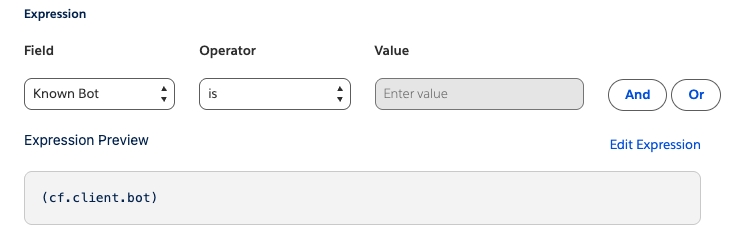
These are useful. Until now, the usual trick to keep Googlebot and Bingbot out of a rate limit was to exclude Google's and Microsoft's ASNs by number. Now you can exempt verified bots directly, or treat AI crawlers differently from search engines if your business wants that.
But verified bots are the polite ones. They announce themselves, and Cloudflare checks they are who they claim to be. The traffic that hurts (scrapers, credential stuffers, inventory hoarders) announces nothing. The release note says it plainly: other Bot Management fields, including bot score, still require the separate entitlement. Known Bot is how you let the good bots through. It doesn't catch the bad ones.
The idea in one picture
Strip away the SFCC details and the concept looks like this:
flowchart LR
    V[Visitors] --> EDGE[CDN edge
firewall rules]
    EDGE --> O[Origin]
    EDGE -. request logs .-> ST[(Log storage)]
    EDGE -. firewall event logs .-> ST
    ST --> D[Detect
low score + high volume]
    ST --> C[Clean up
rules gone quiet]
    B[Business thresholds
+ human review] -.-> D
    D -->|create or update rules| API[CDN API]
    C -->|remove rules| API
    API --> EDGE
The edge logs every request. One function reads the request logs, finds IPs that are both busy and bot-like, and asks the CDN API to put them in a rule. Another function reads the firewall event logs and removes entries nobody has hit for a while. The business sets the thresholds, and a person decides when a rule goes from watching to blocking.
Nothing here is specific to Commerce Cloud. Any CDN that gives you request logs with a bot score and an API for rules can work this way.
What the POC does
For the demo I built it as an SFCC cartridge with a custom job, because that was the fastest way to show the whole loop in one place. The job reads the files the HTTP requests Logpush job drops into S3, and every setting is a job parameter:
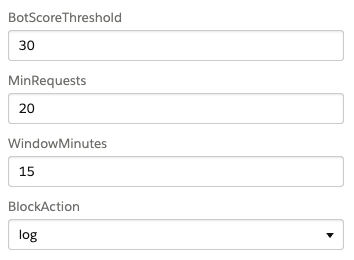
- Bot score threshold. Requests below this count as bot-like. The default is 30. In the video I raised it to 70 on purpose so that my small sandbox traffic would trigger something. That's far too aggressive for real traffic.
- Minimum requests and window. An IP only becomes a candidate with at least this many low-score requests inside the window. The default is 20 in 15 minutes (the video used 10).
- Action. Log, managed challenge, JS challenge or block. I only ever used Log.
- TTL days. How long an IP can stay in a rule without a single firewall hit before cleanup drops it. 14 days by default.
- Max rules. A cap on how many rules the automation may own. A zone allows 500 custom rules in total and you have your own rules too, so leave room.
There's also a dry run switch that logs every decision without touching the zone, and an allowlist of IPs that must never be blocked.
The numbers depend on your Logpush filter
"20 requests in 15 minutes" means very different things depending on what your Logpush job ships. In the Logpush article I suggested keeping only text/html responses. With that filter, one log line is roughly one page view or AJAX call, and 20 low-score lines is a real pattern.
If the job ships everything, a single page view brings its CSS, JS, images, fonts and icons along, easily dozens of lines. Now 20 requests is less than one page load, and one shopper who happens to score low on one visit becomes a candidate. The counts also swing with page weight, so a heavy product page counts more than a light one.
So decide the filter first, then pick the thresholds, and revisit them every time the filter changes.
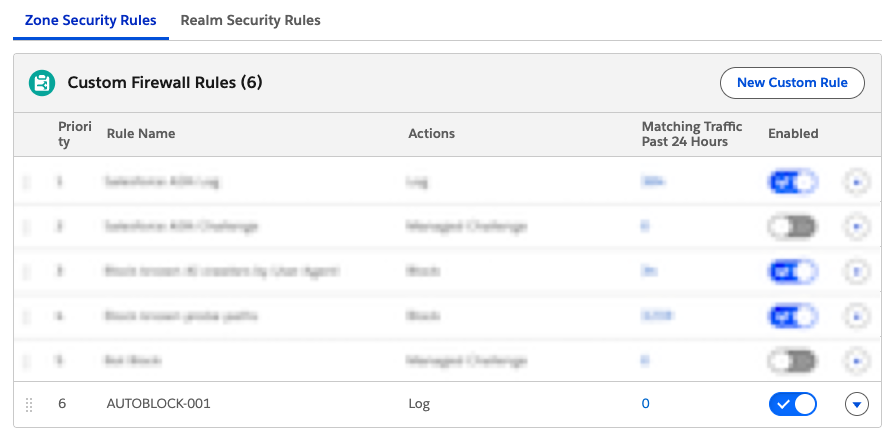
On each run the job groups the window's requests by IP, keeps the IPs that cross both thresholds, and packs them into rules named AUTOBLOCK-001, AUTOBLOCK-002 and so on. A rule expression can be up to 4096 characters, so one rule holds a couple of hundred IPs before the next one starts. The job only touches rules with its own prefix. Your hand-made rules are read for the report and never changed.
It's also declarative. Every run works out the full list of IPs that should be in rules and makes the zone match it, so if a run dies halfway, the next one fixes it.
Here is the run from the video:

Yes, more files than records. Logpush folders are split by day, so the job downloads the whole day's files and then throws away every record older than the window. Most of those 686 files contribute nothing.
Each IP gets logged with its evidence: how many low-score requests, the lowest score, the ASN and the country. Later, when someone asks "why is this IP blocked?", you have an answer. The counts add up across runs, so they can be bigger than one window: by this run, one IP had 82 low-score requests with a minimum score of 3, and the other had 116 with a score of 2.
And here's the result in Business Manager, a new rule at the bottom of the list with the Log action:
Why IPs and not ASNs
Blocking by ASN catches more with fewer rules, and it's much riskier. One ASN can be a whole mobile carrier, a cloud provider or a corporate network, with real shoppers mixed in with the bots. An IP has a much smaller blast radius. It's still not zero, because many people can share one IP behind a corporate network, a mobile carrier or a VPN.
Custom rules or rate limiting rules?
The eCDN has two kinds of rules that can match an IP, and the POC uses custom rules. They fit what the automation produces: a verdict. By the time an IP reaches a rule, the logs have already shown it's bot-like, so the rule only has to match it and apply an action. Custom rules give you room for that (500 per zone), every action including Log, and an order you control.
Rate limiting rules do a different job. They count requests per IP at the edge, in real time, and act when the count goes over a limit within a period. They need no logs, but they can't see the bot score either, and a zone gets only 50 of them. So they complement the automation rather than replace it: keep a general rate limit for everyone (with Known Bot exempted), and let the automation catch the IPs that stay under it but still score like bots.
There is a middle ground: instead of blocking flagged IPs, put them in a rate limiting rule with a stricter limit. A real person who scored low by bad luck never browses fast enough to hit it, but a scraper does. It's a softer landing for false positives, and it costs you one of the 50 slots.
Not for stacked CDN setups
If another CDN sits in front of the eCDN (say Akamai or Fastly), this POC won't work. The eCDN only sees the front CDN connecting to it. As the Logpush article explains, ClientIP is then the front CDN's edge IP, the bot score describes that connection rather than the shopper, and Logpush has no field that could carry the real IP.
So the job would find the wrong IPs, and the rules it writes would match your own front CDN, which means everyone. In a stacked setup, do bot detection at the outermost layer, the one that sees the shopper first. More on that in third-party bot protection.
Why a job on SFCC is not the real-world shape
The POC works, but watch the run in the video and you'll see where the time goes: downloading .gz files from S3 into Commerce Cloud, unpacking them and parsing them. Most of the job is spent moving logs to where the code is, and in the run above that meant 686 files for 99 useful records. That doesn't scale with real traffic.
In a real setup you flip it around and process the logs where they land. That could be an AWS Lambda function that runs whenever a new file shows up in the bucket, or a scheduled Athena query over the same files. The only thing that needs to reach Commerce Cloud is the result: a few calls to the CDN Zones API to create, update or delete rules. Your storefront instance stays out of it.
The CDN Zones docs have SCAPI request examples for every call you need: create, list, update, reorder and delete for custom rules, and the same set for rate limiting rules. One gotcha from building the POC: the API client's token needs two scopes, the tenant scope SALESFORCE_COMMERCE_API:<tenant_id> and sfcc.cdn-zones.rw. Leave out the tenant scope and the token is still issued just fine, but every call comes back 403.
Two loops: one creates, one cleans up
You only get two Logpush jobs per zone, and I suggested spending them on HTTP requests and firewall events. That split fits this setup exactly, one dataset per loop:
- The create loop reads HTTP request logs, finds new bot-like IPs and adds them to rules.
- The cleanup loop reads firewall event logs. Every time an automated rule matches a request, a firewall event lands in the bucket with the client IP. If an IP hasn't triggered anything for N days, cleanup takes it out of the rule, and an empty rule gets deleted.
Why bother with cleanup? Bots rotate IPs, so most entries go stale within days. Without cleanup you slowly fill the 500-rule limit with addresses nobody uses anymore. And IPs get reassigned: the address a scraper used last month might belong to a real shopper today.
My POC does both in one job to keep the demo short. In real life I'd split them into two jobs or functions, each with one purpose, its own schedule and its own failures.
Put together, every IP goes through the same lifecycle:
stateDiagram-v2
    [*] --> Log: detected
    Log --> Challenge: reviewed, no false positives
    Challenge --> Block: reviewed again
    Log --> Removed: quiet for N days
    Challenge --> Removed: quiet for N days
    Block --> Removed: quiet for N days
    Removed --> [*]
Start with Log. Always.
Every automated rule should start life with the Log action. A Log rule matches and records, but lets the request through. You get firewall events showing exactly who the rule would have caught, and nobody is actually blocked.
Leave it in Log long enough to see a normal week, and ideally a busy day like a sale or a launch. Then look at who matched. Real browsers on home connections? Your own monitoring? A payment provider's callbacks? Every one of those is a shopper or partner you would have blocked.
When you move on, go to managed challenge before block. A challenge lets a real person through after a quick check, and a bot usually fails it. Block is the last step, for when you're sure.
A few guardrails I'd have in place before the first run:
- Dry run, then Log, then challenge. Never straight to block.
- An allowlist for your monitoring and uptime checks, load tests, payment and fraud providers, integration partners and office IPs.
- Allow rules on top. Custom rules are evaluated in order, and new rules land at the bottom. Keep your allow rules (with a skip action) above the automated ones.
- A kill switch. Someone on call should be able to turn off every automated rule in seconds, and stop the job that would recreate them.
- A cap on how many rules and IPs the automation can own.
- An audit trail that says, for every IP, why it was added and when.
The business owns the cutoff
This part isn't technical. Salesforce is clear about who does what. From the Bot Management guide:
Bot protection efforts by B2C Commerce are focused primarily on maintaining the availability, stability, and performance of our multi-tenant commerce platform. [...] customers own the monitoring and tuning of the controls to protect against bots on a continuous basis.
So the controls are yours, and the thresholds are a business decision disguised as a number. A score of 30 or 50, 10 requests or 100, challenge or block: each choice trades blocked bots against blocked shoppers. Engineering can build the loop and show the data. The business has to decide how much risk is acceptable and sign off on it. And someone has to keep watching for as long as the automation runs. This isn't a set-and-forget job.
Before you build this
This POC is a cheap way to use a signal you already have. It's not the only option, and often not the first one I'd reach for:
- Rate limiting rules (up to 50 per zone) catch a lot of noisy bots by request rate alone, no logs or code needed. Exempt verified crawlers with Known Bot and they cover a lot of ground.
- The managed WAF rulesets are already in your zone. Check their actions before you write your own rules.
- A dedicated bot product. Behavioral detection that no log job will match. More on that next.
Third-party bot protection
If bots are a serious business problem for you, a dedicated product is the way to go. This slide from a bot management deck sums up the two shapes they come in:
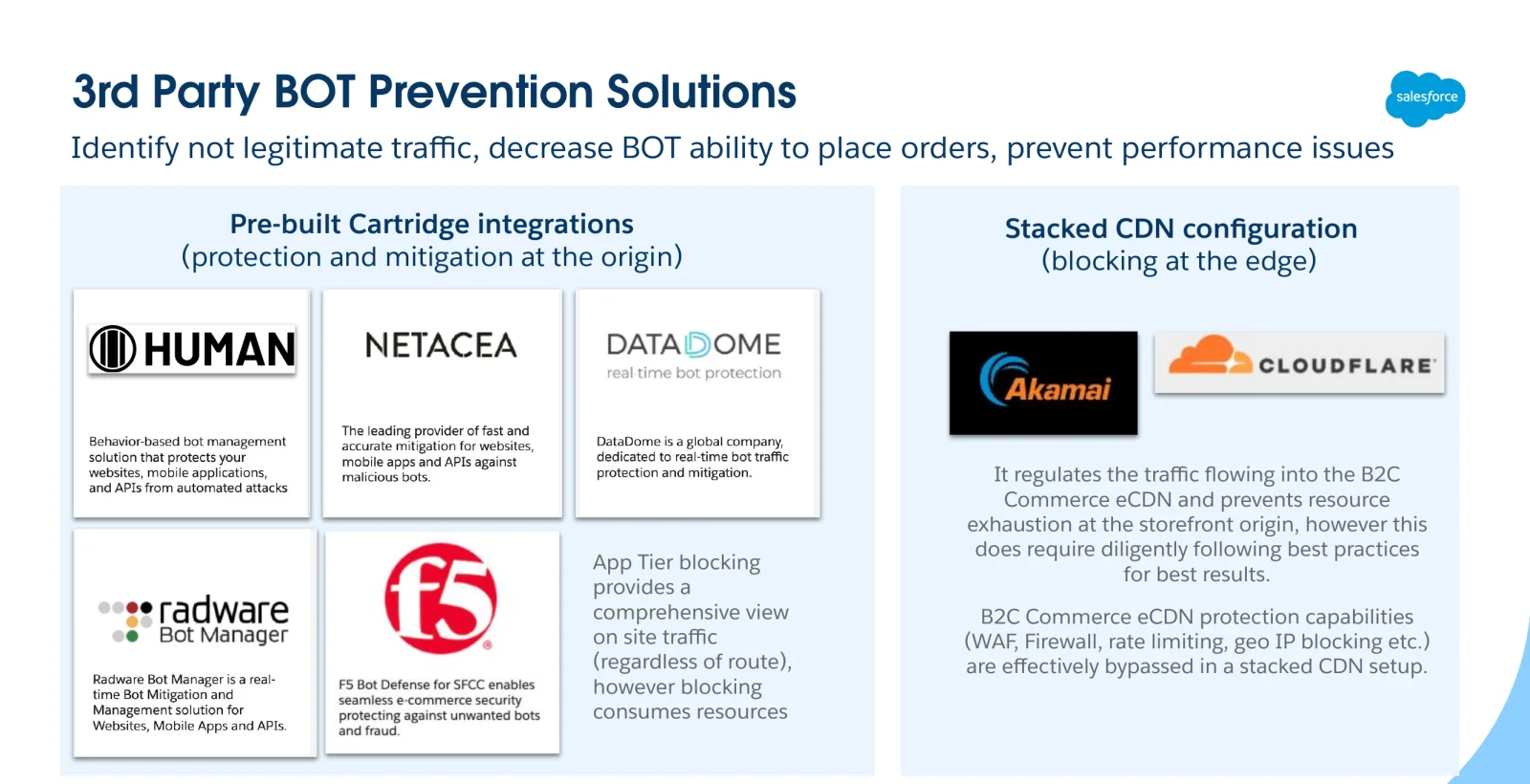
Cartridge integrations, at the origin. HUMAN, Netacea, DataDome, Radware Bot Manager and F5 Bot Defense have integrations that run as part of your storefront. Sitting in the app tier, they see all the traffic that reaches your site, whatever route it took. The catch is in the name: a bot is only stopped once it's already at your origin, so every blocked request still costs you origin resources.
A stacked CDN, at the edge. Akamai Bot Manager or Cloudflare Bot Management, running in your own CDN account in front of the eCDN. Bots are stopped before they reach Commerce Cloud at all, and that's the only one of these options where you can enforce on a bot score at the edge. The price is setup and care. The eCDN now only sees your front CDN, so its own protection (WAF, firewall and rate limiting rules, geo blocking) is effectively bypassed. Plan to follow the stacked CDN best practices closely.
Either way, these are partner products, not Salesforce features, so integration support and pricing come from the vendor. They also cost real money. DataDome is one of the few that publish prices: when I recorded the video, their plans started at about $3,800 a month, and the Enterprise tier at over $13,000. To see who offers a Commerce Cloud integration, search AppExchange for bot apps.
Wrapping up
The eCDN already scores every request. It just won't let you act on the score. Logpush gets the score out, a detection loop turns repeat low-score IPs into Log rules, and a cleanup loop takes them back out once they go quiet. Process the logs where they land and send only rule changes to the CDN API. And keep a person in charge: the business sets the cutoffs, every rule starts in Log, and nothing gets blocked until someone has looked.
Happy bot hunting. 🤖